Installing RMySQL under Windows
Update 2015-06-08: Hadley Wickham and Jeroen Ooms took over the development on RMySQL. They are offering a precompiled version of the package which can be installed unter windows by using install.packages(“RMySQL”). Compiling under windows is no longer necessary.
Update 2015-01-02: I slightly updated this tutorial based on the comments.
Update 2014-12-16: This tutorial also works on Windows 8.1!
Connecting R with MySQL can be somewhat difficult using Windows.
The package RMySQL is not available as a precompiled zip-archive.
It needs the installed libmysqll.dll library to be working and must therefore be compiled on your machine.
Linux and Mac OSX have build-in compilers, Windows does not.
This tutorial shows how to install RMySQL under Windows and give some hints how to avoid too much extra work then updating R.
Step 1: Requirements
- R (surprise! :-) )
- RTools (compiling environment for Windows)
- MySQL-Server (usually the community edition, INCLUDING the C-Connector)
Step 2: Setup and Configuring
I assume that you already have an installed R and the MySQL-Server. This tutorial uses a 64-bit-system (which you also may have nowadays, though). The next step is to install RTools. The offered install options are fine, additional libraries like TCL/TK etc. are maybe needed if you want to compile packages who need them.
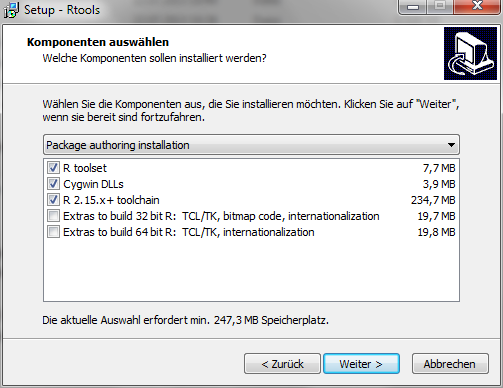
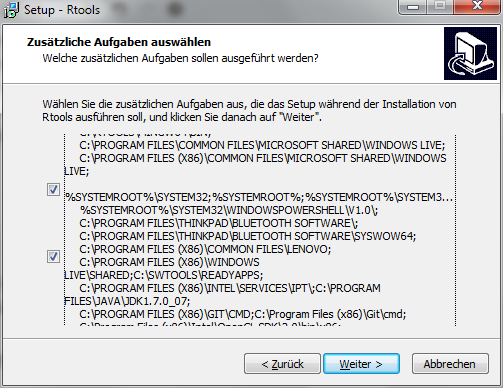
The next window is really arkward. Just leave the the two checkboxes checked and move on to the next step.
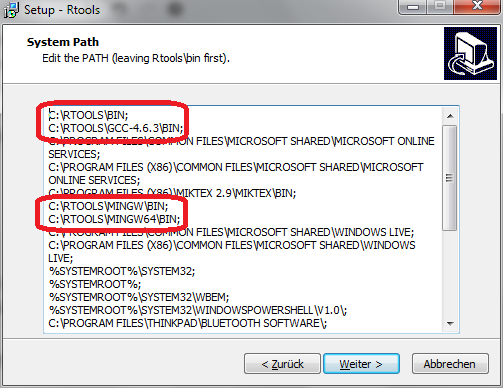
Editing the System Path is important and tells R where the compiler is located. There should be four entries. Please be aware when updating RTools: This sometimes causes double entries (can be deleted).
Step 3: Tell Windows (and R) where the MySQL-Libraries are
RMySQL needs the libmysql.dll to compile successfully. The file should be stored in lib-Folder of your MySQL installation. Usually the path should be C:\Program Files\MySQL\MySQL Server 5.5\lib. The problem is that RMySQL expects it to be stored in the bin-Folder (usually C:\Program Files\MySQL\MySQL Server 5.5\bin). So you have to copy it by hand. This step is essential for successful compiling!
Telling R where to find the libraries can be done by three different options: Command line, environment file (.Renviron) or environment variables. Using command line options must be passed to R at every start which makes it complicated to use IDEs like Rstudio. Using the enviroment file is easier but you have to copy it into every new installation/update of R (which also requires writing rights). I suggest using environment variables as this causes no problems/extra work - espacially when updating R.
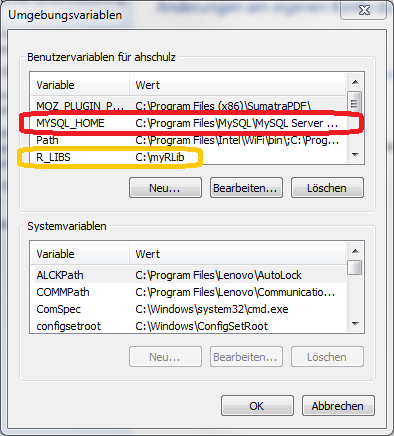
Your environment variables are located under Control Panel → User Accunts → Change my environment variables.
My environment variables look like this (the window is in German as you might have noticed ;-) ).
Now you can add a new variable called MYSQL_HOME with the value C:\Program Files\MySQL\MySQL Server 5.5*.
The last backslash should be added to avoid compiling errors (compare some comments below).
If this does not help, pease try to use slashes instead of backslashes (C:/Program Files/MySQL/MySQL Server 5.5/).
My installed packages are located at *C:\myRLib using the variable R_LIBS (this is optional).
Step 4: Compiling
Now restart R if you have already opened it and install RMySQL from source:
install.packages(“RMySQL”, type = “source”)
Your output should look like this. I truncated all warnings which could usually be ignored.
> install.packages("RMySQL", type = "source")
Warning in install.packages :
  package 'RMySQL' is not available (for R version 3.0.1)
trying URL 'http://ftp5.gwdg.de/pub/misc/cran/src/contrib/RMySQL_0.9-3.tar.gz'
Content type 'application/x-gzip' length 165363 bytes (161 Kb)
opened URL
downloaded 161 Kb

* installing *source* package 'RMySQL' ...
** Paket 'RMySQL' erfolgreich entpackt und MD5 Summen überprüft
checking for $MYSQL_HOME... C:\Program Files\MySQL\MySQL Server 5.5
** libs
gcc -m64 -I"C:/PROGRA~1/R/R-30~1.1/include" -DNDEBUG -I"C:\Program Files\MySQL\MySQL Server 5.5"/include    -I"d:/RCompile/CRANpkg/extralibs64/local/include"     -O2 -Wall  -std=gnu99 -mtune=core2 -c RS-DBI.c -o RS-DBI.o
gcc -m64 -I"C:/PROGRA~1/R/R-30~1.1/include" -DNDEBUG -I"C:\Program Files\MySQL\MySQL Server 5.5"/include    -I"d:/RCompile/CRANpkg/extralibs64/local/include"     -O2 -Wall  -std=gnu99 -mtune=core2 -c RS-MySQL.c -o RS-MySQL.o
gcc -m64 -shared -s -static-libgcc -o RMySQL.dll tmp.def RS-DBI.o RS-MySQL.o C:\Program Files\MySQL\MySQL Server 5.5/bin/libmySQL.dll -Ld:/RCompile/CRANpkg/extralibs64/local/lib/x64 -Ld:/RCompile/CRANpkg/extralibs64/local/lib -LC:/PROGRA~1/R/R-30~1.1/bin/x64 -lR
installing to c:/myRLib/RMySQL/libs/x64
** R
** inst
** preparing package for lazy loading
Creating a generic function for 'format' from package 'base' in package 'RMySQL'
Creating a generic function for 'print' from package 'base' in package 'RMySQL'
** help
*** installing help indices
** building package indices
** installing vignettes
** testing if installed package can be loaded
MYSQL_HOME defined as C:\Program Files\MySQL\MySQL Server 5.5
* DONE (RMySQL)
No you can load your new packages and access your local MySQL-Server.
library(RMySQL)
con <- dbConnect(MySQL(), host="127.0.0.1", port= 3306, user="user",
   password = "password", dbname="db")
I hope this will help someone installing RMySQL properly.